Backups: Encrypted, Automated & Manual
In the ten week solidarity infrastructures class, we walked through how to run software on a self-hosted server on your own local laptop, or in the cloud, but we didn't get around to talking about backups in depth.
While getting the server up and running is most of the work, setting up backups is a non-trivial task that is often forgotten or pushed aside. If you want to make more than zero reliability commitments to your users (which also could be fine, but depends on what you are doing) than having some kind of backup system is necessary, as computer hardware does inevitably sometimes break.
If you are running your server in the cloud, with a provider like Digital Ocean, then backups are pretty easy to set-up, because Digital Ocean has built-in services for automated backups of your entire server that you can pay for. Through the Digital Ocean web admin interface, you can configure any droplet to create automated backups every week or day (depending on your preference), and they also make it very easy to re-create (restore) a droplet from a backup when you need to. This is one of the things that cloud providers make significantly easier than in-person self-hosting. Although cloud providers tend to charge a lot for storage space — so if your server uses more than a few GB of storage, cloud providers are often much more expensive than if you hosted it locally.
On the other hand, if you have a local server without a backup, and your hard-drive fails, you will lose your data. For so many of the beautiful projects people made this would be a shame, so lets talk about ways to back things up.
Simple Backups With Lichen-Markdown
If you used Lichen-Markdown to make a website, then just this week (april 2, 2025) we added a simple way to export (& backup) your website contents through the admin interface. Through the yunohost admin interface, under the "System Update" section, you should see the possibility to update any installed Lichen-Markdown applications to the latest version. After updating, there will then be a new "export" button in the Lichen-Markdown admin interface, when you hover over the "src" folder.
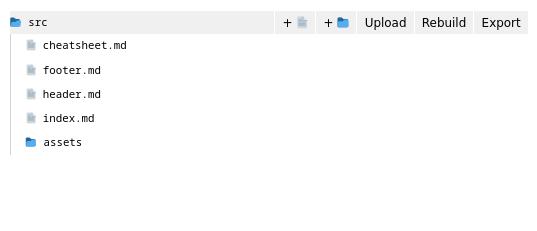
Clicking "Export" will cause a new file called "export.zip" to be created in the assets folder, which contains the entire contents of your website in a zip file.
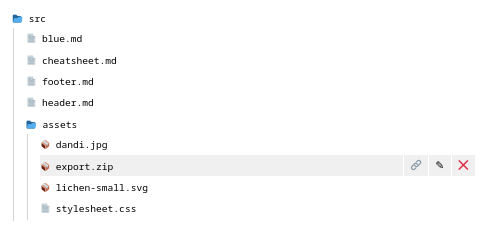
You can then click on export.zip in the files navigator, and this will cause your browser to download the file. This .zip works as a local backup of your site and its contents. This longer tutorial explains the different ways that you could use export.zip to re-create your website or move your data somewhere else.
Simple Backups With Any Yunohost App
The previous method is a very simple, manual (not-automated) way to backup a lichen-markdown website from your server to your local computer. You can do something similarly manual with any application installed via yunohost by going to the "Backup" tab of the yunohost admin interface and then clicking "Local archives". If a backup does not already exist, you can click "Create Backup" and create a new backup, either of a particular app, or of all of your apps and the entire yunohost server configuration. Depending on how much data you store on your server, creating the backup can take some time, but after its created your backup should appear in "local archives" and after clicking on your specific backup, you can click "Download" to download a copy of this backup to your laptop through your web browser.
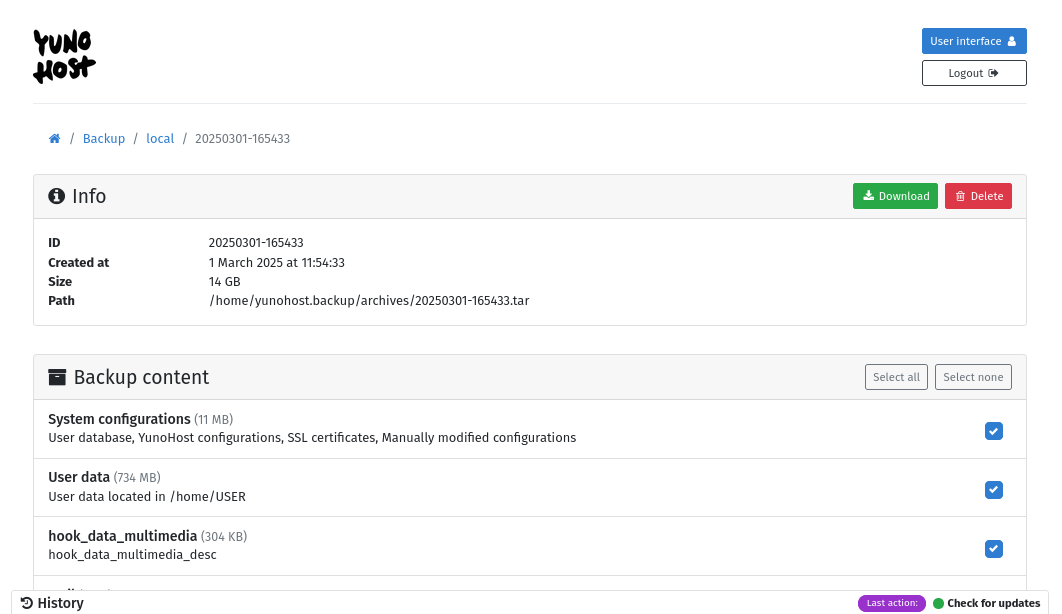
In the future, it is also possible to re-install yunohost, and then restore the entire system, or a particular application, from a backup downloaded in this way.
Manually doing simple backups like this is probably fine for many creative projects, personal websites, and learning experiments, but for more robust applications, some type of automated backup system is probably a good idea.
Automated Encrypted Backups With Borgbase
The backup method that I'm about to describe is the backup system I've used for the Solidarity Infastructures class server — with so many students and teachers making regular contributions to the class wiki, class etherpad, and other class resources, I would really not be happy if the server randomly crashed one day and all that data (or even the last couple weeks of data) was lost. For this reason, for this particular context I thought it was important to setup an automated and encrypted backup system for this server. It took a little bit more time to setup, but once setup, I can happily say that its ran smoothly and hasn't required any additional maintenance yet.
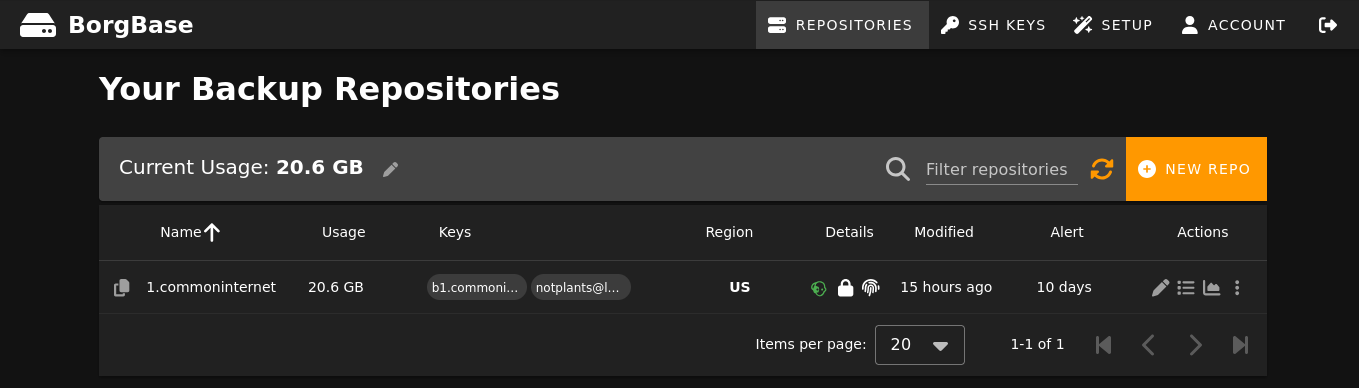
Borg is an efficient and encrypted open source backup software that can be used for regular automated backups of a server. Borg can actually make backups which get stored anywhere (on another server, on your laptop, in the cloud, on an external USB drive). There are also cloud service providers that work in combination with Borg, which let you upload encrypted borg backups to them, such as BorgBase.
Personally, I find this to be a really nice hybrid local/cloud approach. Your backups uploaded to BorgBase get the reliability of a cloud service provider (paying someone to make sure backups are replicated and reliably available, presumably themselves following the 3-2-1 backup rule), but you only ever provide them with encrypted data which is encrypted locally on your server before it is uploaded to the cloud (thus also providing privacy and autonomy).
Yunohost also has a nice integration with BorgBackup. To set this up with yunohost:
- First create an account with BorgBase (which we will use as the backup target)
- Then install the BorgBackup app just like any other Yunohost App onto your server (through the applications section of the yunohost admin interface) and configure BorgBase as the backup target.
After that, your Yunohost server will start saving automated encrypted backups to BorgBase. For peace of mind, through BorgBase you can also configure an automated e-mail alert which will e-mail you if there is ever some period of time (e.g. 10 days) where there wasn't a new backup uploaded to BorgBase from your server.
Automated Encrypted Peer To Peer Backups
As mentioned in the previous section, its also possible to configured BorgBackup to store backups other places than BorgBase. An interesting variation of this would be to have multiple different Yunohost servers acting as backups for each other. In addition to the "Borg Backup" app for Yunohost (which creates and uploads backups to a target), there is also a "Borg Server" application for Yunohost which allows a Yunohost server to act as a target for backups to be saved to. Theoretically it would be possible for two different servers, in different places, to act as solidarity backups for each other in this way (although I haven't yet personally tested this). If a group of people end up trying this out, I'd be curious to hear how it went — in addition to a swap, a larger group could also try other patterns (like a ring, or backing up to two different places). Cobox was also an interesting project in this direction, although it appears that it hasn't had any updates in the last three years — maybe there are also other newer projects exploring more systematic approaches to this (although as mentioned, it doesn't necessarily need to be systematic beyond any collection of people coming up with a system that works for them).